
Is your team trying to stretch SharePoint into a customer portal or external site — only to hit licensing and branding roadblocks? You're not alone. It's one of the most common platform mismatches we see in enterprise engagements.
Here's the uncomfortable truth, stated plainly: SharePoint is the gold standard for internal document collaboration. It was never designed to be your external digital experience platform. Customer-facing portals, supplier extranets, partner self-service, and AI-driven experiences need a dedicated Digital Experience Platform (DXP).
The good news: you don't have to choose. Keep SharePoint for what it's great at — and extend it with Liferay DXP for everything your customers, partners, and AI agents touch. This guide covers the why, the what, and a complete step-by-step how.
Table of Contents
- Why SharePoint Hits a Wall as an External Platform
- The Winning Pattern: Extend, Don't Replace
- The Three-Pillar Transformation
- What Actually Moves: The AI-Powered Migration Hub
- Prerequisites Checklist
- Step-by-Step: Your SharePoint → Liferay DXP Project
- Decision Matrix: What Stays vs. What Moves
- Business Outcomes & KPIs
- Common Pitfalls & How to Avoid Them
- How Pyronite Can Help
- FAQ
1. Why SharePoint Hits a Wall as an External Platform
SharePoint + Microsoft 365 is a superb internal stack: co-authoring, OneDrive sync, Teams integration, tenant-wide search. The problems start when you point it outward:
| Pain point | Why it hurts |
|---|---|
| External-access licensing | SharePoint can serve customer portals, but it "often requires additional configuration, licensing, or third-party tools to support external access and more advanced scenarios" (Liferay's own comparison). Guest access at scale becomes a governance and cost exercise. |
| Branding & UX limits | Customization is constrained to the SharePoint look-and-feel framework. Pixel-perfect, marketing-grade public sites and guided customer journeys fight the platform every step. |
| Multi-audience experiences | Liferay DXP ships native support for external portals and multi-audience experiences; SharePoint's support is limited — it's strongest inside M365 and "limited outside." |
| Enterprise integration | Liferay offers open, headless APIs across ERP, CRM, and legacy systems. SharePoint integrates beautifully — as long as you stay in Microsoft's garden. |
| Portal-grade features | Personalization, advanced RBAC across audiences, multi-site from a single instance, built-in workflow, low-code Objects, search-driven experiences — Liferay builds these in; SharePoint assembles them from Power Platform add-ons. |
Liferay's own feature-by-feature comparison makes the positioning explicit: SharePoint = collaboration & document management; Liferay DXP = full DXP for public websites, authenticated portals, and intranets. (For what it's worth, Gartner Peer Insights™ ratings sit at 4.6/5 for Liferay vs 4.4/5 for SharePoint.)
Bottom line: if your roadmap includes customer portals, supplier extranets, partner onboarding, or AI-powered self-service — you need a DXP, not another SharePoint workaround.
2. The Winning Pattern: Extend, Don't Replace
Do not throw away your M365 investment. The architecture that works in the real world is coexistence:
┌────────────────────────┐         ┌────────────────────────────┐
│   INTERNAL (M365)      │         │   EXTERNAL (Liferay DXP)   │
│                        │         │                            │
│  SharePoint            │ ───────▶│  Customer Portals          │
│  ├─ Legal Docs         │  Headless│  Partner / Dealer Portals  │
│  ├─ HR Portal          │  APIs +  │  Supplier Extranets        │
│  └─ Project Files      │ Connector│  Public Marketing Sites    │
│                        │         │  Unified Digital Workplace │
│  Teams · OneDrive ·    │         │                            │
│  Co-authoring          │         │  + Liferay AI Hub agents   │
└────────────────────────┘         └────────────────────────────┘
        Internal single                    External, branded,
source of truth permission-aware DX- SharePoint manages your internal files. Co-authoring stays untouched — zero disruption to employees.
- Liferay DXP powers your external digital experiences — full control over branding, journeys, and multi-audience permissions.
- Integration keeps them in sync — mount SharePoint libraries directly inside Liferay's Documents & Media, or sync over headless APIs.
- AI orchestrates on top — Liferay AI Hub agents read grounded knowledge from both worlds, with every interaction permission-checked and audited.
Together: an AI-ready powerhouse instead of two silos.
3. The Three-Pillar Transformation
3.1 Total Experience (TX) beyond intranets
Keep SharePoint for internal document co-authoring, and use Liferay DXP for external audiences: seamless customer/partner portals and public sites with full control over branding. One platform spans employee experience (EX), customer experience (CX), and partner experience — the "total experience" your users actually feel.
3.2 Co-exist & integrate (extend, don't replace)
Integrate SharePoint document libraries into Liferay DXP via headless APIs and secure them under Liferay's robust access control. The official Liferay REST Connector to SharePoint mounts SharePoint Online / SharePoint 2016 libraries as first-class repositories inside Liferay Documents & Media — browse, upload, check-in/check-out, download, and search, with changes propagating both ways.
3.3 Orchestrate AI via Liferay AI Hub
Bring AI to your documents. With Liferay AI Hub (Liferay's standalone, low-code agent SaaS) you build chatbot agents and AI-driven search that interface directly with your enterprise knowledge bases — including SharePoint libraries — through the Model Context Protocol (MCP). Liferay AI Hub is model-agnostic (OpenAI, Claude, Gemini…), permission-aware (agents act as the authenticated user), and governance-ready (GDPR, HIPAA, SOC 2, ISO/IEC 42001).
📖 Deep dive: read our companion guide — Liferay AI Hub: Complete Step-by-Step Setup Guide.
4. What Actually Moves: The AI-Powered Migration Hub
Our migration diagram (the hero image above) shows the pattern we deploy:
- Left — Legacy ecosystem (SharePoint): Legal Docs, HR Portal, Project Files.
- Center — AI-Powered Orchestrator & Migration Hub: the pipeline that extracts, classifies, transforms, and loads content with AI assistance (metadata enrichment, deduplication, ACL normalization).
- Right — Modern digital experience (Liferay DXP): content lands as governed, API-first building blocks.
| From SharePoint | What flows | To Liferay DXP | Why it matters |
|---|---|---|---|
| Document libraries (Legal, HR, Projects) | Raw files | Liferay Documents & Media | Versioned, searchable, permission-controlled repository |
| Columns / content types | Metadata | Liferay Objects (custom object schemas) | Structured data becomes queryable, API-exposed business entities — not flat files |
| Folder permissions / AD groups | Access Control Lists (ACLs) | Liferay RBAC roles & permissions | Fine-grained, multi-audience security preserved end-to-end |
| Employee / member directories | User profiles | Liferay users, orgs & user groups | One identity, personalized journeys |
| Legal/HR reference files | Legal/HR files + metadata | Unified Digital Workplace | Governed, wake-up-anywhere access for staff and partners |
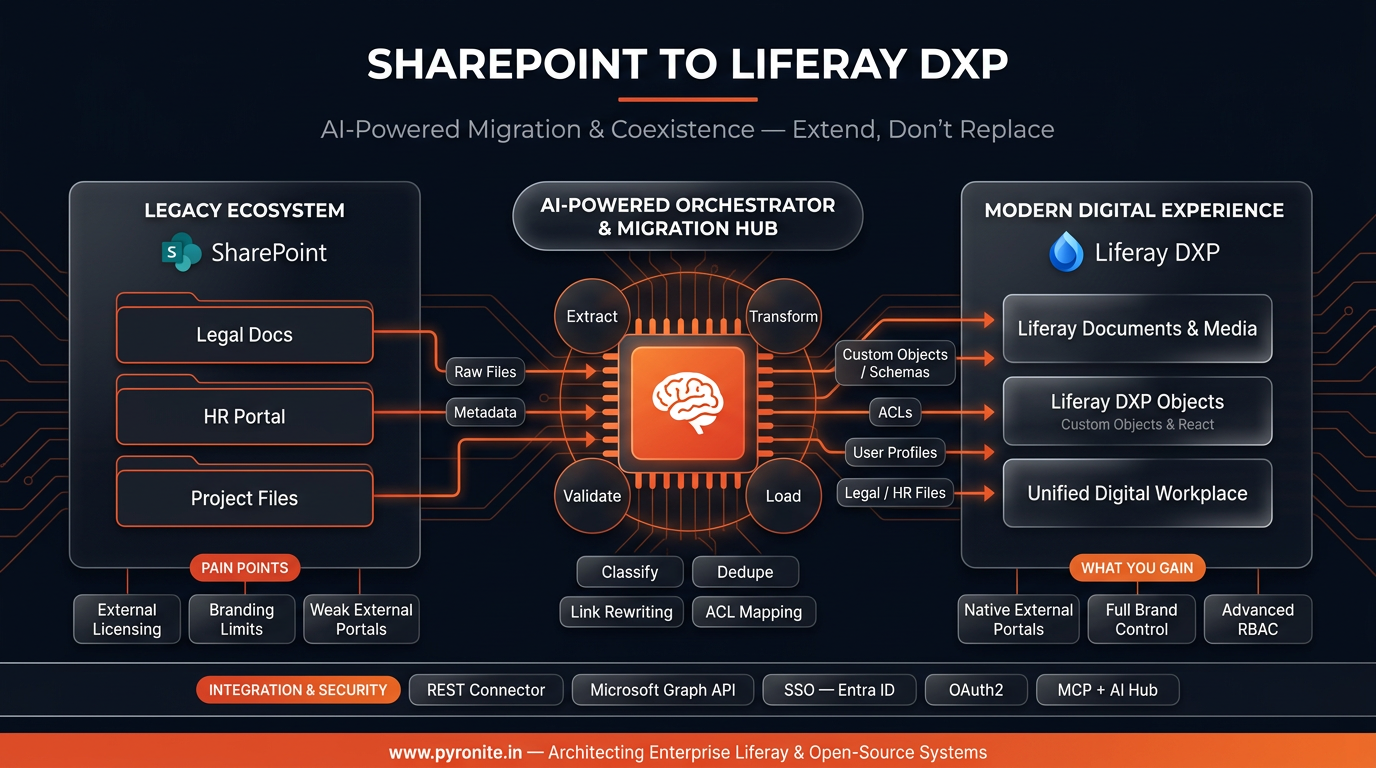
Fig 1. AI-powered orchestration and migration hub moving SharePoint legal docs, HR portal and project files into Liferay DXP.
The AI angle isn't cosmetic: an AI-orchestrated migration uses LLM agents to classify documents, infer and normalize metadata/map columns→Object fields, flag duplicates and ROT (redundant/obsolete/trivial content), and validate that every ACL mapped to its Liferay role correctly — turning months of manual content-surgeon work into a supervised, auditable pipeline.
5. Prerequisites Checklist
| # | Prerequisite | Notes |
|---|---|---|
| 1 | Liferay DXP environment (2026.Q1 LTS recommended) | SaaS, PaaS, or self-hosted — deployment flexibility SharePoint doesn't offer. Free activation tier available for evaluation. |
| 2 | SharePoint Online (or 2016+) admin access | Required for app registration and connector authorization. |
| 3 | Microsoft Entra ID (Azure AD) app registration | For OAuth2 (Azure ACS) — required by the REST connector; Graph API app for migration sync. |
| 4 | Liferay REST Connector to SharePoint (LPKG) | DXP subscription, via Liferay Marketplace; deploys to [LIFERAY_HOME]/deploy. |
| 5 | HTTPS everywhere | The connector's OAuth2 flow requires TLS on your app server. |
| 6 | Content inventory & owner sign-offs | Know what exists before deciding what moves. |
| 7 | Identity strategy | SSO via Entra ID (SAML/OIDC) so Liferay and SharePoint trust the same identities. |
| 8 | (Optional) Liferay AI Hub access | For AI-orchestrated migration and post-launch AI agents. |
6. Step-by-Step: Your SharePoint → Liferay DXP Project
Step 1 — Audit & inventory
Crawl every site collection, library, content type, permission set, and workflow. Classify each content set: internal-only (stays), external-facing (moves), both (integrates live). Tag ROT content for archival, not migration.
Step 2 — Decide per content set: stay, move, or integrate
Apply the decision matrix below. Write it down, get business owners to sign off. This document is your scope contract.
Step 3 — Stand up the target architecture
Provision Liferay DXP environments (dev/uat/prod), configure SSO with Entra ID, and register the SharePoint/Graph apps with least-privilege scopes (Sites.Read.All for read-sync — write scopes only where integration demands).
Step 4 — Design the Liferay information architecture
Model sites & page structures, then map SharePoint content types → Liferay Objects and AD groups/ACLs → Liferay roles. Build the role model before moving a single file — retrofitting security is how migrations fail audits.
Step 5 — Quick win: mount SharePoint inside Liferay (coexistence)
- Deploy the REST Connector to SharePoint LPKG; restart; confirm the module is Active.
- Configure SharePoint OAuth2 (authorization grant + token endpoints for SharePoint Online).
- Add a repository of type SharePoint in Documents & Media → your internal libraries now appear inside Liferay, bi-directionally synced, under Liferay access control.
- (Optional) Define custom search sources to refine SharePoint search results inside portal search.
External users see governed SharePoint content in your branded portal — without a single SharePoint license.
Connector limits to plan around (from the official docs): moving/renaming a file without check-out first loses version history; file extensions can't change; comments/ratings aren't supported; a SharePoint folder can't be a Documents & Media root folder.
Step 6 — Run the AI-orchestrated migration (for content that moves)
Pipeline, per batch:
- Extract via Microsoft Graph API / connector export (files + versions + metadata + ACLs).
- Transform — LLM agents classify content, map metadata columns → Liferay Object fields, normalize authors/users, flag duplicates; deterministic code handles links, encodings, and paths.
- Load into Documents & Media / Objects via Liferay Headless APIs.
- Validate — automated reconciliation: counts, checksums, permission parity reports (every source ACL ↔ target role), broken-link scans.
Migrate in waves (Legal → HR → Projects…), each wave ending in a signed reconciliation report.
Step 7 — Rebuild the experiences
This is where the DXP earns its keep: branded portal pages with fragments and client extensions (React/Next.js frontends), personalized dashboards per audience, search-driven content experiences, workflow-driven self-service (requests, approvals, onboarding) — the journeys SharePoint couldn't deliver.
Step 8 — Layer on AI (Liferay AI Hub)
- Deploy a portal chatbot agent grounded in the migrated knowledge + live SharePoint libraries (via MCP).
- Add AI search assistants across both repositories — agents retrieve only what the requesting user may see.
- Automate: new document in SharePoint's Legal library → agent summarizes, tags, and publishes the approved brief to the customer portal (human review checkpoint before publish).
Step 9 — Test, UAT & cutover
Persona-based testing (customer, partner, employee, guest), permission-leak probes, performance tests on the integrated search, and a parallel-run window before DNS/URL cutover with redirect maps for any retired SharePoint URLs.
Step 10 — Govern, monitor, iterate
Analytics on portal journeys, AI Hub dashboards (agent response time, task completion, cost), audit trails wired to your SIEM, and a quarterly content-governance review. Migrations end; platforms evolve.
7. Decision Matrix: What Stays vs. What Moves
| Content / capability | Verdict | Pattern |
|---|---|---|
| Internal working documents & co-authoring | Stay in SharePoint | Mount via REST connector if staff should find them from Liferay |
| Team sites & M365 collab | Stay | Link/SSO between platforms |
| Customer-facing document libraries | Move to Liferay DXP | Migrate → Documents & Media + RBAC |
| Structured business data & forms | Move | Rebuild as Liferay Objects with workflows |
| Public marketing content | Move | Liferay Web Content + fragments + personalization |
| Knowledge bases for AI/chatbots | Both | Live-integrate SharePoint + migrate curated sets; ground AI Hub agents in both |
| Partner/supplier extranet spaces | Move | Purpose-built Liferay partner portal |
Rule of thumb: internal audience → SharePoint; external audience → Liferay DXP; both → integrate live.
8. Business Outcomes & KPIs
- Cost: zero incremental SharePoint external-access licensing for portal audiences; one subscription covering the experience layer (Liferay offers a perpetual license with subscription support — and a free activation tier to start).
- Experience: page-branding freedom, faster portal task completion, NPS/CSAT on self-service journeys, search success rate.
- Speed: content publish time on external sites (hours not days); AI agent response & task-completion times.
- Risk: 100% permission-parity on migrated ACLs; audit coverage on every AI interaction; zero guest-access sprawl.
- M365 value preserved: internal collaboration untouched — adoption disruption ≈ zero.
9. Common Pitfalls & How to Avoid Them
| Pitfall | Consequence | Fix |
|---|---|---|
| Big-bang "migrate everything" | Rot content, blown timelines | Wave-based migration; ROT archival first |
| Retrofitting the role model | Permission leaks, failed audits | Map ACLs→roles in Step 4, before content lands |
| Moving files without check-out (connector) | Version history lost (documented limitation) | Check out before move; or migrate via Graph with versions |
| Ignoring SharePoint links inside documents | Broken references post-cutover | Link-rewriting in the transform stage + redirect map |
| Flattening metadata into folders | Lost structure, unusable search | Metadata → Liferay Objects fields, not folder hierarchies |
| Over-scoping Graph app permissions | Security review rejection | Least privilege; read-only unless integration needs write |
| AI agents reading everything | Data exposure | Scoped service accounts + permission smoke tests (see our AI Hub guide) |
| Skipping parallel run | Cutover chaos | 2–4 week parallel run with reconciliation dashboards |
10. How Pyronite Can Help
Pyronite architects enterprise Liferay & open-source systems — and SharePoint→DXP transformation sits at the intersection of two of our core practices:
- Liferay Migration & Upgrade — legacy-to-Liferay migrations with zero-downtime cutovers: content pipelines, ACL→RBAC mapping, checksum-level reconciliation, and portal re-platforming on Liferay DXP 2026.Q1 LTS.
- AI & MCP — custom MCP servers for SharePoint/Graph and line-of-business systems, RAG over your knowledge bases, and governed Liferay AI Hub agents (chatbots, AI search, document intelligence).
- Enterprise Development & DevOps — headless React/Next.js frontends, client extensions, CI/CD, and the infrastructure that keeps it all fast.
Our AI-orchestrated migration framework — Audit → Architecture → Pipeline → Experience → AI → Govern — is exactly the ten-step path above, run by senior Liferay engineers.
👉 Connect with us to scope your SharePoint → Liferay DXP assessment. Most clients see a working coexistence proof-of-concept (mounted libraries + branded portal) inside three weeks.
11. FAQ
Do we have to leave SharePoint completely?
No — and you shouldn't. SharePoint remains unbeatable for internal co-authoring. The winning pattern is coexistence: internal collaboration stays on M365, external experiences move to Liferay DXP.
Can Liferay really read/write my SharePoint libraries?
Yes. The official Liferay REST Connector to SharePoint (SharePoint 2016 and SharePoint Online) mounts libraries inside Documents & Media with bi-directional sync, check-in/check-out, and custom search sources — secured by OAuth2 via Azure ACS.
What about external-user licensing costs?
That's a major driver: Liferay DXP natively supports external/multi-audience portals, so you stop paying SharePoint/M365 guest-access overhead for portal audiences and stop fighting workarounds.
Where does AI fit in? Can chatbots use our SharePoint knowledge?
Yes. Liferay AI Hub agents ground themselves in enterprise data via MCP — including SharePoint libraries and Liferay content — and always act with the requesting user's permissions, with full audit trails.
How long does a typical migration take?
Coexistence integration (mounting libraries, SSO): weeks. Full phased migration of a mid-size estate with portal rebuild and AI layer: typically 3–6 months, wave-based, with zero downtime.
What's the riskiest part?
Permissions. Always. Which is why ACL→RBAC mapping happens before content moves, and every wave ends with an automated permission-parity reconciliation report.
Key Takeaways
- SharePoint ≠ DXP. It's the gold standard internally — and the wrong tool for customer-facing, multi-audience experiences.
- Extend, don't replace. Protect the M365 investment; mount SharePoint libraries inside Liferay DXP via the official REST connector and headless APIs.
- Move what serves external audiences — files to Documents & Media, metadata to Liferay Objects, ACLs to RBAC, users to Liferay identities.
- AI is the multiplier — AI-orchestrated migration, plus Liferay AI Hub chatbots and AI search grounded in both repositories, with governance built in.
- Sequence matters: role model first → coexistence quick win → wave-based migration → experiences → AI → governance.
SharePoint manages your internal files; Liferay DXP powers your external digital experiences. Together, they form an AI-ready powerhouse. 🚀
References
- Liferay Learn — Enabling Liferay's REST Connector to SharePoint (OAuth2/ACS setup, capabilities, limitations): learn.liferay.com
- Liferay — Liferay vs SharePoint: feature-by-feature comparison (external portals, licensing, RBAC, deployment): liferay.com/compare/liferay-vs-sharepoint
- Liferay — AI Hub capability page (MCP integrations incl. Microsoft, governance, triggers): liferay.com/capabilities/ai-hub
- Pyronite — Liferay Migration & Upgrade / AI & MCP services: pyronite.in/services
© 2026 Pyronite Technologies LLP. Originally published at pyronite.in.